
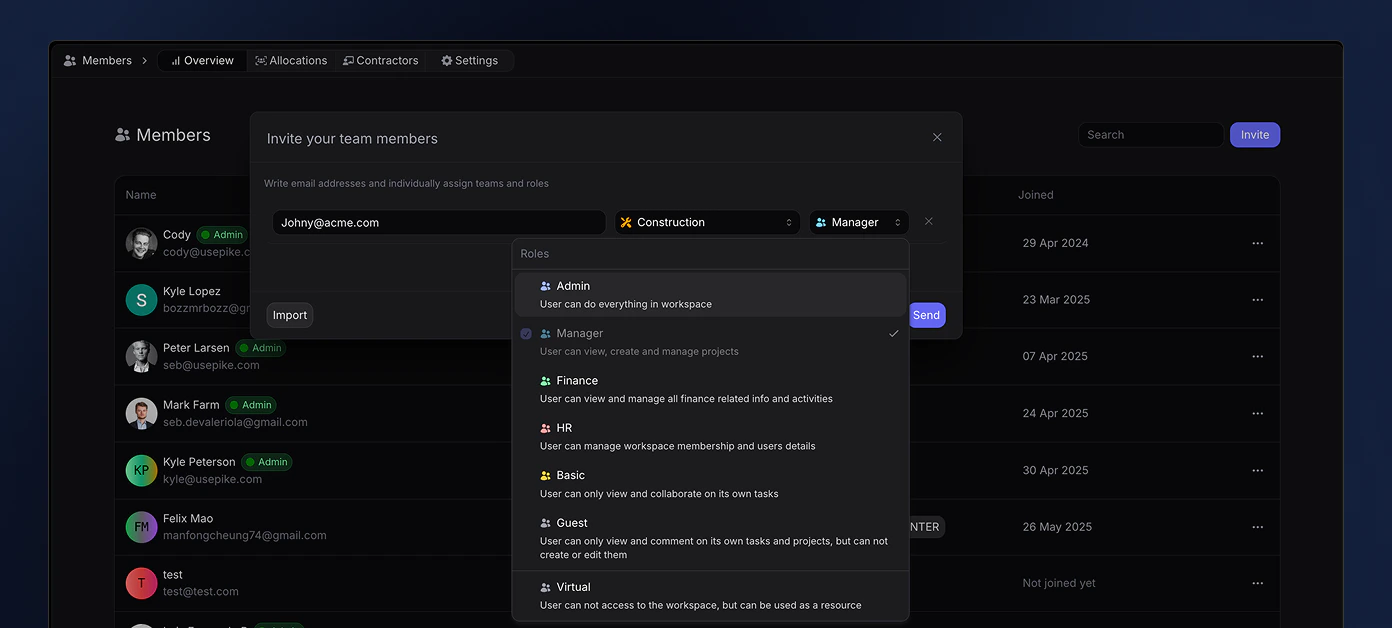
Available Roles
Here are the current six roles available in Pike:Admin
The Admin role has the highest level of access within a workspace. Users with this role can view and edit everything in the workspace:- View, edit, and delete all content within the workspace.
- Manage user roles and permissions.
- Configure workspace settings and features.
Manager
The Manager role is designed for users who oversee projects and teams. Those with this role can:- View, edit, and delete all project-related content.
- Manage team assignments and monitor progress.
- Collaborate with team members to ensure project success.
Finance
The Finance role is tailored for users responsible for financial management within the workspace. Users in this role can:- Access financial reports and invoicing information.
- Manage budgets and expenses related to projects.
- View member financial metrics.
- Ensure compliance with financial policies and procedures.
HR
The HR role is focused on managing personnel within the workspace. Users with this role can:- Manage members at the workspace level.
- Edit personal details of team members.
- View member financial metrics.
- Oversee onboarding and offboarding processes.
- View and edit teams.
Basic
The Basic role is intended for general users who require limited access. Those with this role can:- View projects assigned to them.
- Edit tasks that are specifically assigned to them.
- Collaborate with team members on their assigned tasks.
Guest
Guest users are mostly used for external members such as customers, in order to give them visibility in the same format as your projects. Guest users only have access to view tasks and projects they have been assigned to. They are only allowed to write and reply to comments. You can have as many guest users as you want, free of charge.Virtual user
When inviting members to your workspace, you can choose to add them as a virtual user. A virtual user will not get an invitation to the workspace or have access to it, until an admin or HR converts them to a regular user. It is possible to define a virtual users skills, position, cost and capacity, as well as assign them to teams, projects and tasks.User Interface & Access Control
Each role in Pike has a customized user interface that reflects their permissions:Sidebar Visibility
All users will have access to the My tasks, Log and Teams section.- Admin: Full sidebar access including Workspace Settings, Members, Finance, and all other sections.
- Manager: Access to Projects, Teams, Tasks, and Members sections.
- Finance: Can view project finance tab and workspace finance page. Has access to view invoices, deals and financial dashboards.
- HR: Focus on Members section with limited visibility of other areas.
- Basic: Can view teams and projects they are part off and only view tasks they are assigned to.
Sidebar
Learn more about each section of your sidebar.
Action Restrictions
Even if users occasionally see UI elements they don’t have permission for:- Attempting unauthorized actions will trigger clear error messages
- Example: “You don’t have permission to perform this action. Please contact your workspace admin.”
- This provides an additional layer of security beyond UI customization
Data Privacy
We take a multi-layered approach to access control:- UI customization to show relevant options
- Permission checks on all actions
- Strict data access controls at the API level
- Comprehensive audit logging of access attempts