
Key Features
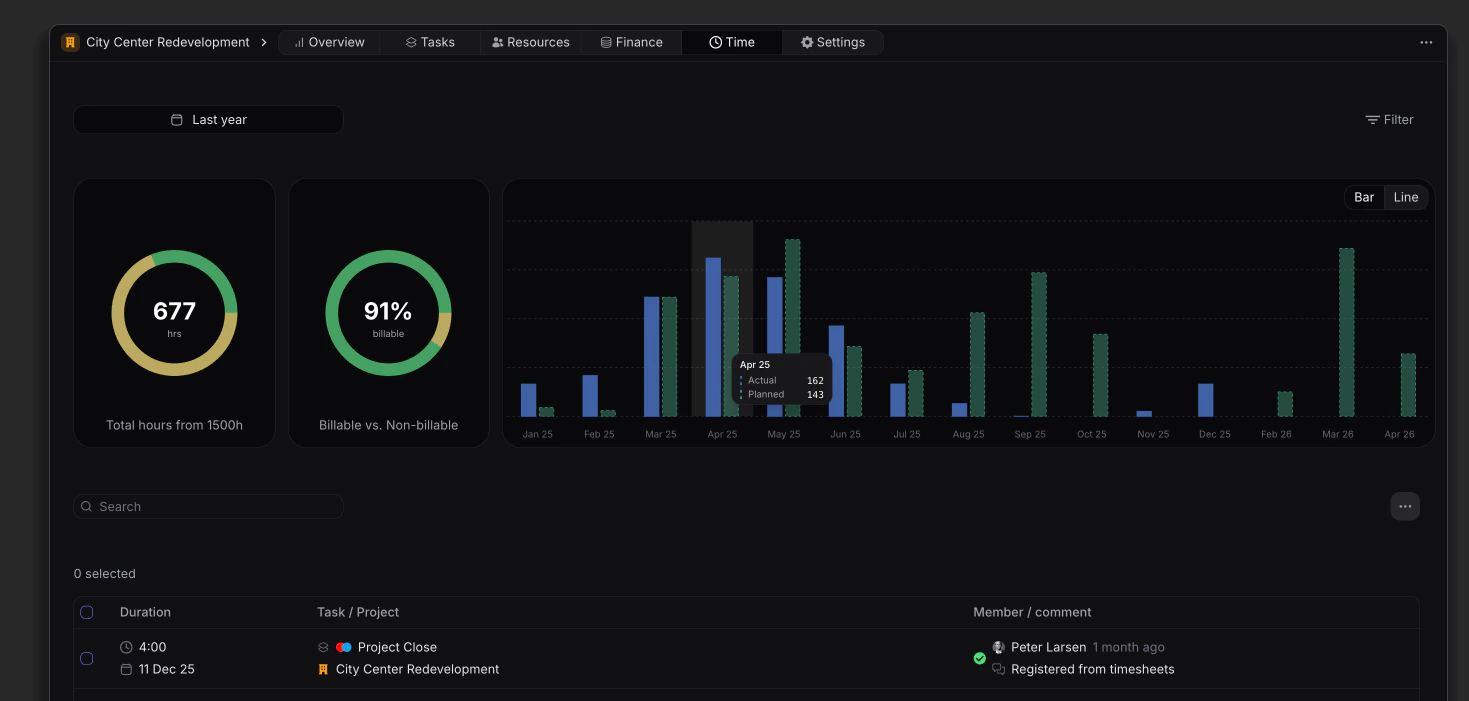
Time budget
Set your project time budget to automatically have time entries tracked against it for a real-time planned vs actuals overview. When filtering by either; Team(s), Member(s), Approval status, Billing status, Task label(s) or Task billable status, the budget will adjust accordingly.Billable hours distribution
When tracking time on tasks, depending if the task is set to be billable or non-billable, this distribution can be viewed here. When filtering by either; Team(s), Member(s), Approval status, Billing status, Task label(s) or Task billable status, the billable hours distribution will adjust accordingly.Planned vs actuals
Choose between a bar or line chart to view the planned versus actuals on your project. Especially usefull to break your budget down over the project lenghts and ensure targets are met. When filtering by either; Team(s), Member(s), Task label(s) or Task billable status, the planned and actuals will adjust accordingly.Time entries
The Time view includes a list that displays all detailed time entries related to the project, providing essential information such as:- Duration and Date: The amount of time registered and the date of entry.
- Task & Project: The name of the task as well as task label(s) associated to the task.
- Approval status: The current stage of the time entry; Registered, Submitted, Approved or Rejected.
- Member & Comments: Who made the time entry and associated comments.
- Export time entries to CSV.
- Summarize using AI
- Change billable status (See how this impacts finance metrics here.)
Filtering
You can filter the Project time page by:- Time range (calendar picker)
- Team(s)
- Member(s)
- Approval status
- Billing status
- Task label(s)
- Task billable status